1-minute self introduction script
A 1-minute self introduction is about 140 words at a relaxed pace, in four parts: your name and role, what you do in plain words, one specific detail people will remember, and what you are looking forward to with this group. Skip the life story. Fill in the template below, then read it aloud once in the online teleprompter to check it fits the minute.
Target: 1 minute, about 140 words at 140 words per minute · Example below: 124 words, about 53 s
How long it should be
At 140 words per minute, one minute is 140 words. Nerves make most people speed up, so a draft a little under that leaves room to slow down on your name and still finish on time.
If the host gives everyone 30 seconds instead, keep the name, the role and the one detail, and drop the rest.
The structure
-
Your name and role
Say your name slowly. People miss the next few seconds if they are still trying to catch it, so give it a beat of silence afterwards.
-
What you do, in plain words
Describe the work, not the job title. "I work out why customers contact us" tells people more than "I am a data analyst".
-
One detail they can ask you about
A past project, a place, a hobby. One specific thing gives people an easy way to start a conversation with you later.
-
What you are looking forward to
End on something that points at the group: what you hope to learn, or what people can come to you for.
Template
Replace everything in {braces}. Lines in [square brackets] are cues: they show faintly on the prompter and are never read or counted. Keep, change or delete them. New to the format? See how to format a teleprompter script.
[smile, look up]

Hi, I'm {first name} {last name}.
[say your name slowly]

I've just joined {the team, class or channel}
as {your role},
and I'll be working on {the main thing you will do}.

Before this, I {previous job, course or project},
where I {one concrete thing you did}.

[pause]

Something you might not guess about me:
{one specific detail people can ask you about}.

I'm looking forward to {what you hope to do with this group},
and if you ever need help with {something you know well},
come and find me.

Thanks, it's good to meet you all. Tapping copies your script first. Paste it into a new script in OwlPrompter (free, no account).
Example: joining a new team
Daniel has just joined a customer support team as its data analyst and is introducing himself at the Monday team meeting.
[smile, look up]

Hi, I'm Daniel Okafor.
[say your name slowly]

I've just joined the customer support team
as the data analyst,
and my job is to work out
why people contact us in the first place,
so we can fix the cause
instead of answering the same question twice.

Before this, I spent three years
at a bike-sharing company in Leeds,
where I built the dashboard
that told the repair crews which bikes to fix first.

[pause]

Something you might not guess about me:
I bake bread every Sunday,
and I'm still chasing the perfect sourdough.

I'm looking forward to sitting in on a few calls
in my first couple of weeks,
and if you ever need a spreadsheet untangled,
come and find me.

Thanks, it's good to meet you all.
Tapping copies your script first. Paste it into a new script in OwlPrompter (free, no account).
Opening a script in the browser replaces the one saved in the online teleprompter on this device. Nothing is uploaded.
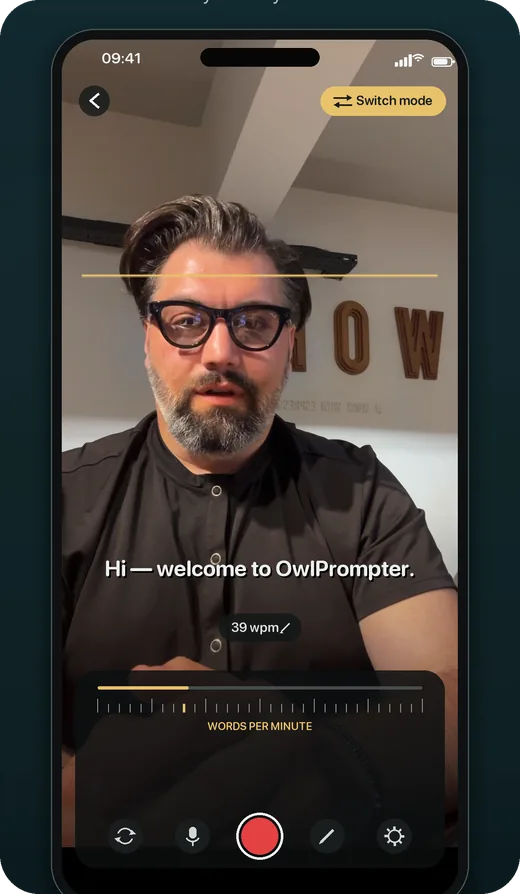
Read it on your phone
Recording your introduction for a new team, a course or a channel? OwlPrompter puts the script on your phone next to the camera and scrolls it at the words per minute you set, so you can read and still look at the lens.
OwlPrompter is free with no account, for up to 3 scripts, with recording, a Delivery Score and an .srt file with every take. Voice scroll (the script follows your voice) and eye-contact mode are part of Pro, and both Pro plans, monthly and yearly, start with a 7-day free trial for new subscribers.
Tips for introducing yourself
-
Change the middle, keep the shape
For a class, swap the previous job for what you studied and what you hope to learn. For a video, add one line on what the channel will cover. The four parts stay the same.
-
One detail, not three
A list of hobbies blurs into nothing. One specific thing, like the sourdough, is what people remember and ask about at lunch.
-
Put a pronunciation on the prompter
If people often get your name wrong, add it in brackets after the name, like Siobhan [shi-VAWN]. You will not say the bracket, but it reminds you to say the name clearly.
-
Leave out the CV
Years and titles fade within a minute. One thing you actually did, in one sentence, is what sticks.
-
End with an offer, not "so, yeah"
Most introductions trail off. A closing line that tells people what you can help with gives you a clean place to stop.
Questions
How long should a self introduction be?
For a team meeting, a class or a video, about a minute, which is 140 words at 140 words per minute. In a job interview, a fuller answer of 60 to 90 seconds works better; see the tell me about yourself script.
What should I leave out of a self introduction?
Your full work history, anything you would need to explain or apologise for, and openers like "I'm not good at this". They spend your first seconds on something other than you.
Is it OK to read a self introduction from a script?
For a recorded video, yes: a prompter near the lens lets you read and still look at the viewer. In a room, read it from the script three or four times beforehand until you only need the first word of each part, then speak from memory.
Finished your draft? Check its length in the speech timer, then rehearse it in the free online teleprompter or in the app.