How to read a script while looking at the camera
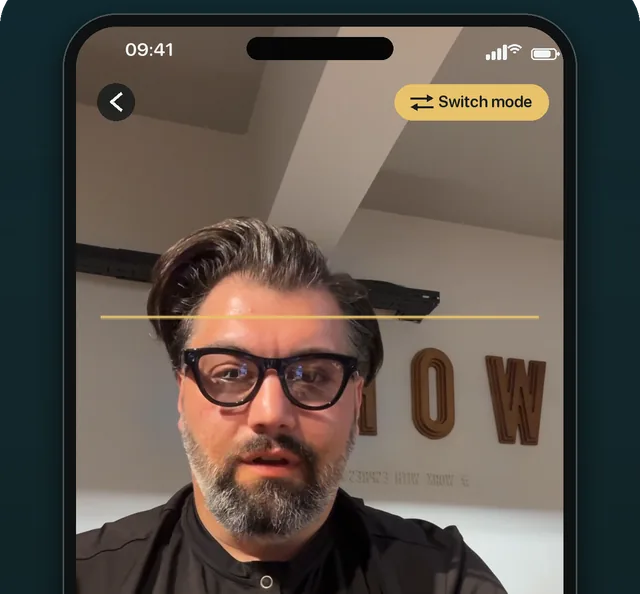
Put the words as close to the lens as you can and keep them in a narrow column, so your eyes barely move while you read. On a phone, read from the top of the screen just under the front camera; on a laptop, use a narrow window at the top-middle under the webcam; with a separate camera, use a teleprompter glass that puts the text in front of the lens. Then sit farther back, read in short phrases, and look straight into the lens at the end of each sentence.
Updated
Why distance to the lens is everything
A viewer does not see what you are looking at; they see the angle between your eyes and the lens. That angle grows with the distance between the words and the camera, and shrinks the farther you sit from both. Every tip below either moves the words closer to the lens, moves you farther back, or reduces how far your eyes travel across a line.
Pick the setup for your camera
-
Phone: read at the top of the screen
Record with the front camera and keep the line you are reading near the top edge, right under the lens. A teleprompter app that records from the prompter screen does this by design.
-
Laptop: a narrow window under the webcam
Place the prompter in a short, wide window at the top-middle of the screen and set its reading line near the top. The teleprompter for laptop page covers MacBooks with a notch too.
-
Camera: text over the lens
A beam-splitter teleprompter reflects the screen onto angled glass in front of the lens, so you read straight down the barrel. The text must be mirrored to read correctly in the glass; the online teleprompter has a Mirror switch.
-
Camera without a rig: monitor right under the lens
No glass? Put the screen showing the script directly below the camera, as close as the tripod allows, and stand back.
Reading habits that hide the rest
- Narrow the column. Raise the side margins so each line is only a few words wide; wide lines are what make eyes sweep.
- Sit back and size up. More distance with slightly larger text beats close-up with small text.
- Slow the scroll. When the text runs ahead of you, your eyes chase it down the screen.
- Look up on the last word. Finish each sentence looking into the lens; it reads as eye contact even if the middle of the sentence did not.
- Read in phrases, not words. Take in three or four words, then say them to the lens.
Check before you post
Record thirty seconds and watch it with the sound off. With no words to follow, eye movement jumps out, and you will see exactly where it happens. Fix the setup, not your acting.
OwlPrompter’s Delivery Score, free after every take, includes an eye-contact percentage alongside pace, pauses and filler words, so you can compare setups with a number instead of a guess.
If the angle still shows after all that, OwlPrompter’s AI eye contact (iPhone and iPad, part of OwlPrompter AI) corrects it in the finished take: it turns your gaze back to the lens and keeps the original next to it.
If your eyes are fine but the delivery still feels stiff, read how to read a script without sounding scripted.
Questions
How far should I sit from a teleprompter?
As far as you can while still reading comfortably at a text size you can scale up to. More distance makes every eye movement smaller on camera.
Why does a teleprompter glass need mirrored text?
The glass reflects the screen below it, which flips the image left to right. Mirroring the text on the screen flips it back, so it reads normally in the glass.
Is it better to memorise the script?
For a few lines, yes. For anything longer, a well-placed prompter usually looks more natural than a half-remembered script, because you are not searching for the next line.