For Android
A teleprompter app for Android that follows your voice
OwlPrompter runs on Android phones and tablets with Android 8.0 or later. Read with the script scrolling as you speak, float the prompter over another app, record video or audio with the words on screen — with no account, and your scripts stay on your phone.
Voice scroll for reading and rehearsal
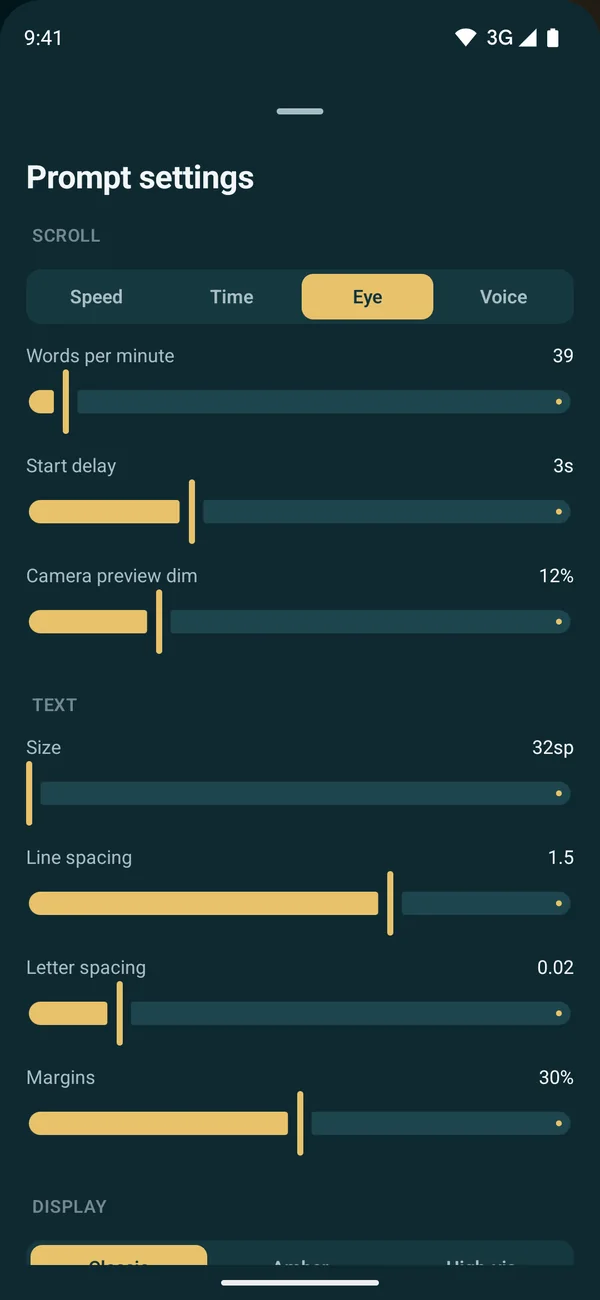
In teleprompter mode, voice scroll (Pro) listens through Android’s own speech recognition and moves the script as you say the words; pause and it waits. You pick the recognition language in settings — it starts as your phone’s language — and it runs offline where your phone has Google’s offline speech pack for it. When you record video, use speed or timed scrolling.
- Pause and it waits
- Tap any word to jump there
- [Bracketed] cues stay faint and are skipped
Float the prompter over other apps
The floating prompter sits over any other app — a video call, a camera app, a streaming app. Drag it where you need it, resize it, and set its speed and opacity.
- Drag and resize
- Speed and opacity controls
- Works over other apps
Record video or audio with the script on screen
Film with the front or back camera in portrait or landscape, or record audio only for a podcast or voice-over. Filters are free and leave no watermark; captions burned into the picture and virtual backgrounds — blur, studio, gradient or your own photo — come with Pro. Every take comes with a matching .srt subtitle file.
- Front or back camera, portrait or landscape
- Audio-only recording
- .srt subtitles with every take
Go live, then see how it went
Stream to TikTok, YouTube, Facebook or any RTMP server (Pro) with the prompter running; it reconnects on its own if the network drops. After a take, the Delivery Score shows your pace, pauses and filler words — the first scored take in a language downloads its speech model, so do that one on Wi-Fi.
Questions
Which Android version do I need?
Android 8.0 or later, on phones and tablets.
Is it free on Android?
Yes. Speed and timed scrolling, recording with filters, PDF, DOCX, TXT and RTF import, the Delivery Score and up to 3 scripts are free, with no watermark. Pro Monthly unlocks voice scroll, eye-contact mode and unlimited scripts. See current pricing in the app. The AI features are on iPhone and iPad only for now.
Does eye-contact mode work on Android?
Yes, in teleprompter and audio modes (Pro): turn away from the camera and the scroll holds until you face it again. While you record video, use speed or timed scrolling.
Can I use a Bluetooth remote or keyboard?
Yes. Enter, Space or the media play key starts and pauses the scroll, left and right change the speed, and up and down change the text size.
Keep reading
See every feature, what Pro costs, or use the free online teleprompter right now.