For iPhone
A teleprompter app for iPhone that follows your voice while you film
OwlPrompter makes your iPhone the prompter and the camera at once: the script sits right by the front camera, and the take records in the same app. It runs on iOS 18 or later and is free to start, with no account and no watermark. With Pro, the script scrolls as you speak.
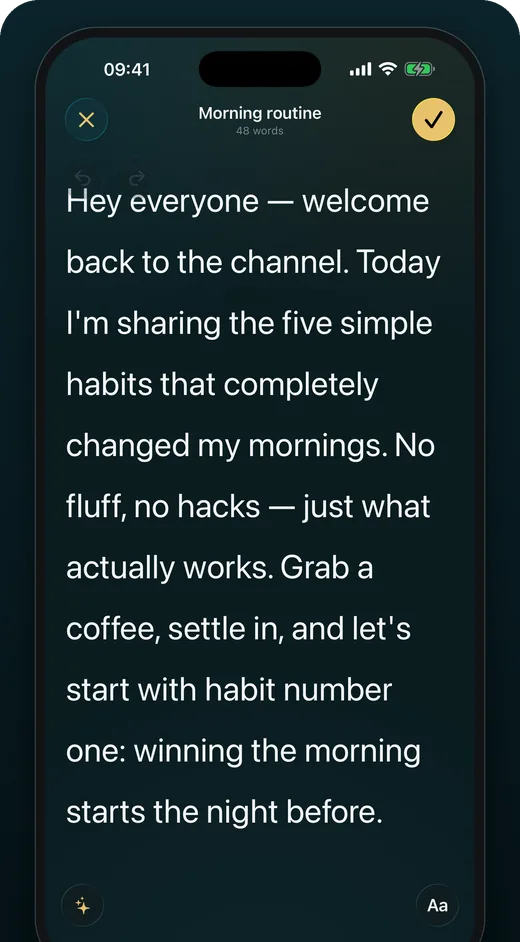
Read and film on one phone
Open a script, pick the front camera and press record. The words stay right by the lens, so your eyes barely move. With Pro, voice scroll moves the script as you say the words and waits when you pause, and it keeps following you while the camera rolls.
- Voice scroll and eye-contact mode while you record (Pro)
- Or set a speed, or fit the script to a set time
- Tap any word to jump there
- [Bracketed] cues stay faint and never appear in the video
The file looks like the preview
Filters are free and leave no watermark. With Pro you can blur or replace the background and burn captions into the picture, all rendered into the recording. Every take comes with a matching .srt subtitle file, and with Pro the app reframes a take for Reels, TikTok, Shorts or YouTube when you share it.
- Front or back camera, portrait or landscape
- Audio-only recording for voice-overs
- No account: recordings stay on your iPhone
Float the script over other apps
On a call, or filming with another camera app? In teleprompter mode, the floating prompter (Picture in Picture) keeps the script in a small window over the other app, scrolling at the speed you set. Voice scroll stays in the full prompter.
Control it from your wrist
The Apple Watch app is a remote for the prompter on your iPhone: play, pause, change the speed or restart, and see your pace or recording time. A Bluetooth remote or keyboard works too, so you can run the scroll from behind the camera.
Check the take, then fix the eyes
The Delivery Score after every take shows your pace, pauses, filler words and eye contact, worked out on the iPhone itself. If your eyes still drift, AI eye contact (OwlPrompter AI) corrects your gaze in the finished take and saves the result as a new take next to the original.
Questions
Which iPhones does it run on?
Any iPhone on iOS 18 or later. One purchase also covers iPad and Mac on the same Apple Account.
Is it free on iPhone?
Yes. Speed and timed scrolling, recording with filters, PDF, DOCX, TXT and RTF import, the Delivery Score and up to 3 scripts are free, with no watermark. Pro unlocks voice scroll, eye-contact mode and unlimited scripts, monthly or yearly with a 7-day free trial. See current pricing in the app.
Does voice scroll work while I record?
Yes. On iPhone it keeps following you while the camera rolls. It uses the speech recognition built into iOS, on the iPhone itself wherever iOS offers on-device recognition for your language; where it does not, iOS may send the audio to Apple to transcribe.
Does eye-contact mode work while I record?
Yes, with Pro. Turn away from the camera and the scroll holds until you face it again.
Does it work without internet?
Prompting, recording, eye-contact mode and the Delivery Score all run offline, and voice scroll does too wherever iOS offers on-device recognition for your language. The AI features and live streaming need a connection.
Keep reading
See every feature, what Pro costs, or use the free online teleprompter right now.
Get OwlPrompter
Free to start. Pro starts with a 7-day free trial on the App Store and Google Play.